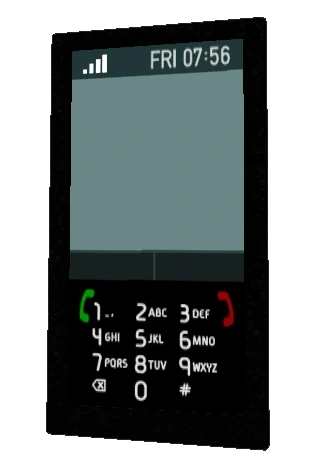

Badger phone in GTA IV, without the Badger logo.
The mobile phone, also known as the cellphone and cell phone (smartphone in Grand Theft Auto V and Grand Theft Auto Online), is a recurring portable communication device that has been carried by protagonists in various Grand Theft Auto games. Prior to Grand Theft Auto IV, the phone's use was fully scripted and uncontrollable in the case of making calls at will; the functionality of mobile phones is greatly expanded in Grand Theft Auto IV, and then even further in Grand Theft Auto V.
Description
2D Universe
In Grand Theft Auto, mobile phones technically function identically to pagers, delivering messages (often one-way) to the player at the bottom of the screen, representing verbal communication instead of the pager's text messages. Much like the pager, messages delivered via a mobile phone are displayed in text form beside the graphical representation of the phone.
The mobile phone is also present in the Grand Theft Auto: London mission packs and functions identically to GTA's mobile phone, but is refashioned into a walkie-talkie as modern mobile phones were not available in the 1960s.


3D Universe
Grand Theft Auto: Vice City marked a return of the mobile phone after being absent in Grand Theft Auto 2 and Grand Theft Auto III. The mobile phone's role remains unchanged as it is often used between missions and important events, but primarily complements face-to-face interactions between characters.
Since GTA Vice City, players can choose to answer a ringing mobile phone; failing to answer a call will usually lead to the phone repeatedly ringing between a period of silence until the player answers it, or after the effects of not answering the phone is activated (i.e. a decrease in the player's relationship with a girlfriend). During a verbal exchange on the phone, the player's mobility is reduced while the player holds the phone, being incapable of jumping, sprinting, or holding and shooting a weapon until the call ends. Since GTA San Andreas, players may also have the option to skip an in-between-mission phonecall.
In GTA Vice City, Tommy Vercetti retrieves a phone from Leo Teal during Back Alley Brawl, allowing him to receive calls from in-game characters about missions or other topics. The phone's design is based on Motorola DynaTAC, a hugely successful cellphone during the 1980s.
In Grand Theft Auto: San Andreas, Carl Johnson has a phone which he uses to make and receive calls. Again, these may be about missions, relating to the general story, tips from other characters, or may serve no particular purpose — for example, the prank calls CJ receives from Catalina. The HUD icon exists in game files, but it won’t show in normal gameplay. If the player has not visited a girlfriend for a long time, they can sometimes receive calls from any of the six of the girlfriends telling the player to come and date them. The phone's design is that of an early flip-phone, with a small LCD display for numbers. Its in-game manufacturer is Konikson. It is based on the Motorola MicroTAC cellphone of the late 1980s/early 1990s, specifically the Digital Personal Communicator model.
In Grand Theft Auto: Liberty City Stories, Toni Cipriani retrieves a phone from a deceased Sindacco Crime Family member in Snuff. This phone is presumably the phone he uses from then on, as Toni originally called using a payphone in Home Sweet Home. The phone's function is similar to those in GTA Vice City and GTA San Andreas, but is depicted as a late-1990s clamshell phone. It is based on the Motorola StarTAC clamshell cellphone.
In Grand Theft Auto: Vice City Stories, the phone was replaced by the pager. Some characters can still be seen using mobile phones in cutscenes, which assume the same design as in GTA Vice City.


Grand Theft Auto IV
The use of the mobile phone is greatly expanded in Grand Theft Auto IV, The Lost and Damned and The Ballad of Gay Tony, featuring a multitude of features, including the ability to:
- Call various characters, including storyline-relevant contacts, or friends and girlfriends for leisure activities; use of the phone can also trigger certain missions, like The Holland Play, preemptively calling some characters may trigger story-related dialogue quicker;
- Receive text and multi-media messages from people;
- Access cheats;
- Access multiplayer;
- Call emergency services (such as police cars, ambulances, and fire trucks) for assistance;
- Change the phone's ringtone, text size and turn on/off vibration (console version).
- The player can change the text size in the phone with the "Text Size" in the options menu; for the console versions of the game, this is only available if the resolution is set to 1080i.
In GTA IV, the player starts out with a Badger phone (given to Niko Bellic by his cousin Roman during the second mission) which features a monochrome display as well as limited functionalities (listed above). During Photo Shoot, the player is given an upgraded replacement, a Whiz wireless phone equipped with:
- A digital camera used in certain missions but otherwise has little practical use other than to see in first person view, as camera shots outside relevant missions are not saved;
- Support for advanced polyphonic ringtones and animated phone's wallpapers (known as "themes" in the game).
Themes and advanced ringtones of the phone can be purchased from Vipluxuryringtones.com via the in-game internet. The website is initially unavailable in GTA IV until the second model of the phone is acquired.
In The Lost and Damned and The Ballad of Gay Tony, the player's phones are practically identical to Niko's second phone but with cosmetic changes. Johnny Klebitz and Luis Fernando Lopez each have a unique theme for their phones; as Johnny's phone assumes a more hardy appearance with a black leather case and has a unique "Lost MC" theme featuring The Lost MC's emblem, while Luis' phone appears to be more luxurious and modernised than Niko and Johnny's phones and is round, similar to Johnny's, has a glowing blue keypad and a unique "Club" theme.
Protagonists' phones resemble the following real-life phones:
- Niko's Badger/Whiz phone sort of resembles a Sony Ericsson W302 without directional buttons.
- Johnny's phone is nearly identical to Niko's, but given it comes covered in a phonecase, it looks more rounded than Niko's rectangular phone and the numbers on the keypad are separate buttons, whereas the numbers on Niko's phone use a "key strip" layout, used on phones like the Motorola Razr.
- Luis' Badger Touchscreen Phone resembles an HTC Desire (although the HTC debuted in early 2010, while the game is set in 2008).
As an exclusive feature in The Ballad of Gay Tony, the player can replay any accomplished mission via their phone in order to achieve a better score.


Storyline Contacts
TLaD Contacts
| Character | Appears from | Disappears at |
| Angus | Clean and Serene | N/A |
| Ashley | Clean and Serene | N/A |
| Billy | Clean and Serene | This Shit's Cursed |
| Brian | Clean and Serene | N/A |
| Clay | Clean and Serene | N/A |
| Elizabeta | Buyer's Market | After Shifting Weight |
| Jim | Clean and Serene | Was It Worth It? |
| Ray | Diamonds in the Rough | Was It Worth It? |
| Stubbs | Buyer's Market | N/A |
| Terry | Clean and Serene | N/A |
TBoGT Contacts
| Character | Appears from | Disappears at |
| Armando | I Luv LC | N/A |
| Bulgarin | ...Blog This! | Departure Time |
| Dessie | Chinese Takeout | N/A |
| Henrique | I Luv LC | N/A |
| Mom | I Luv LC | N/A |
| Mori | Practice Swing | Departure Time |
| Rocco | Ladies' Night | Departure Time |
| Tony | I Luv LC | Departure Time |
| Yusuf | Chinese Takeout | Departure Time |
Exploits
If the player has damaged a vehicle to the point where the engine won't start, the phone can be used to "jumpstart" it by calling any number or contact — the engine will spontaneously function again, although no damage will be repaired. For convenience's sake, one can cancel the phone call as soon as "Calling..." is seen on the phone's display — the engine comes back to life as soon as the call is initiated.
In the console versions of the game, the phone can also be used as a kind of "super handbrake", to instantly stop any vehicle, no matter the speed. Initiating the camera while driving will instantly stop the car — the player can leave the phone open to the "Camera" menu option, and then press  (on PlayStation 3) or
  (on Xbox 360) when they want to stop. This is presumably a bug, and was fixed in the PC version — activating the phone camera while driving on PC will merely change the game camera to the "hood cam" perspective, and activate the phone camera as normal. As this exploit requires a camera function, it can only be performed once the player has acquired the second model of the phone.
If the player pulls out the phone while passing through a tollbooth, the toll can be payed without stopping the car completely, as long the player slows down the speed of the vehicle.
Platform-Exclusive Features
In the PS3 version, an additional option is available in the phone. It is a SIXAXIS tutorial that teaches the player on how to use the SIXAXIS controller in the game. Selecting SIXAXIS tutorial (disabled during missions or when having a wanted level) in the PS3 version will place the player on an airport runway.
In the PC version, the Video Editor is an option in the menu of the phone.
In both versions, the game will exit out of gameplay, but unsaved progress won't be lost, and once the player leaves the Video Editor, the player will then be teleported to the nearest safehouse. Leaving the SIXAXIS tutorial will teleport the player in front of the airport terminal.
Grand Theft Auto V
In the GTA V Game Informer cover story, Rockstar Games has said that GTA V will "preserve the mobile phone concept", but Rockstar has made changes to it, such as the player not receiving phone calls from friends all the time (as seen in GTA IV). Rockstar made these changes because of fans' feedback regarding how much story content was hidden on the phone, with these activities instead appearing on the map. Rockstar also said that even though phones will lose some "functionality", it will gain new features as well. Rockstar described it as being a contemporary phone, with Dan Houser saying that the player will use it for activities such as "accessing the internet", (much like a smartphone). All pictures taken in-game can be shared to the Rockstar Games Social Club via Snapmatic.
Michael De Santa owns an iFruit 9iX smartphone. However, he can be seen in 2004 with a Celltowa Cellphone, during the mission Prologue. Even though this is not a touch-screen phone, Michael will operate it as such if the player uses First-Person View. Trevor Philips has a Facade smartphone, and Franklin Clinton has a bitterSweet smartphone.
Protagonists' phones resemble the following real-life phones:
- Michael's phone clearly resembles an iPhone 4/iPhone 4s. In the enhanced version, it resembles an iPhone 5c.
- Trevor's phone possibly resembles a Nokia Lumia 820, with the shape of a Nokia Lumia 730. In the enhanced version, however, it resembles a Sony Xperia E.
- Franklin's phone resembles a Samsung Galaxy SIII. In the enhanced version, however, it resembles a BlackBerry Curve 9380 and/or a Google Nexus S.
The protagonists' smartphones reference three of world's most popular smartphone platforms: Michael's references Apple iOS, Trevor's references Windows Phone, and Franklin's references Android OS. Their phones are also suited to their real-life counterpart typical users: Samsung phones are favored by youngsters, while iPhone is favored by wealthy people and Nokia has a reputation of surviving harsh conditions much like Trevor's lifestyle, and is known to be one the most durable phones out there (in the enhanced version, Trevor's phone has a crack on the screen, further referencing his reckless and violent way of life). The software of the three platforms, however, is mostly based on iOS, and aside from aesthetics in-game, all three phones function in the exact same way.
Unlike in previous games, contacts are not removed from phones - this means that the numbers for deceased characters remain in the player's contact lists long after their deaths.


Grand Theft Auto Online
In GTA Online, players can use the phone to access features such as calling characters for jobs, or using the Darnell Inc. app if they own the Garment Factory. The player can also use their phones to bank their cash into Maze Bank's website.
For the most part, the protagonist does not physically pull out their phone, which still allows for movement and combat. The only exception is when they use the Snapmatic app, although due to perspective, only other players can fully see them.
The protagonists' phone is identical to Michael's iFruit phone, only with different apps and the colour of the + button.
In the top left corner, there are 3 bars that represents a cellphone's signal strength.

Trivia
Grand Theft Auto: Vice City
- To make up for the inability to skip phone calls in this game, any NPCs (including cops) attacking Tommy will stop during a call. They will resume the attack once the call ends.
Grand Theft Auto: San Andreas
- In older editions of the game, if the player has dual pistols wielded and gets a phone call, Carl will pull out two phones.
- If Carl has his phone out and runs into water being sprayed from a Firetruck, chances are that if he is just finishing a conversation and is about to put his phone away, he will instead keep it in his hand. This is because the animation for putting the phone away was interrupted by Carl falling, so it is skipped altogether.
- When Carl is answering a phone call in front of an oncoming train, Carl will get stuck in front of or under the train while he is talking. He cannot get up and will slowly lose health until he is wasted.
- If the player switches or fires weapons after a phone call, the phone will not disappear from CJ's hand. Switching to other weapons or entering a car can fix this minor glitch.
Grand Theft Auto IV and Episodes From Liberty City
- If a player applies a custom theme, they can see that any other pedestrians with their phones out will have the same theme.
- The pre-installed ringtone "Pager" is a simplified version of Grand Theft Auto's theme song, also heard as the pager's ringtone in Grand Theft Auto III and for the retro Rockstar Games logo of Grand Theft Auto: Vice City.
- Whenever a phone is seen on advertisements, it always has a battery life with one segment missing (the battery level appears to be at 69%, another reference to the 69 sex position). However, characters' phones have unlimited battery life.
- Niko can still access a phone before Roman gives him his old one, although its only options are Multiplayer and Video Editor (PC-exclusive).
- If Niko's stance is affected in any way while talking on the phone (getting hit by a car, getting shot, etc.), the phone will be immediately put away, ending the call.
- If the protagonist receives a phone call whilst in a vehicle, a radio interference noise will be heard.
- In The Lost and Damned, Brian's phone number is never removed from Johnny's phone even after Johnny kills him.
- While the player can use the Camera feature outside of missions, photos cannot be saved in any way.
- If the player uses the Camera feature at either of the strip clubs, the strippers will scream in distress, even if the player is not necessarily photographing them. If the player continues to use the Camera, bouncers will ask the player to leave, and they will receive a wanted level if they refuse.
- In the Xbox 360 version, the phone icon and menu select buttons on the left side are green. However, in the PS3 version, they are blue.
Grand Theft Auto V and Online
- One of the ringtone sounds in GTA V has a beat of Fatamarse's "Bump To The Music" from GTA III.
- Of the three protagonists, Trevor is the only one who cannot change the background wallpaper on his phone, as his Facade has the permanent "brick wall" theme, satirizing the limited customization typical of Windows phones.
- In the original version of GTA V, when the protagonist talks on the phone while driving, he holds the phone to his ear, whereas from the enhanced version onwards he holds the phone in his hand near the steering wheel.
- In the original version of GTA V, long phone calls will cause the phone to disappear from the screen, though the conversation will continue. This is no longer the case in the enhanced version; the phone now won't disappear from the screen until the entire conversation is finished.
- On the PC, Xbox 360, and Xbox One versions of GTA V, the plus sign is green and the number pad button is blue. However, on the PS3 and PS4 versions, the plus sign is blue and the number pad button is pink.
- If the player activates first-person view in the enhanced version of GTA V, a mini cell phone icon will appear on the bottom left of the screen (next to the minimap) during phone calls.
- While hiding from the police whilst having a wanted level, if the player brings up their mobile phone, the police might rediscover the player's current location and the map once again flashes red and blue.
- If the player calls any contact while standing in shallow water, the phone may ring indefinitely without ever being answered or going to an answering machine. This will last until the player hangs up.
- In GTA Online, dialing 911 will permanently add it as a contact under Emergency Services.
- There is a secret phone in the files known as a "police phone", complete with its own player overlay and more.[ref?ref?This fact is likely to be disputed and needs a source for confirmation.] It was presumably intended to replace the iFruit for the GTA Online Protagonist.
- Inside the game files, there is the texture file containing the icons of the three mobile phones, and several of them represent features cut during development.
- In GTA Online, if the player is scrolling through the phone and receives a notification for a Job, the phone's sound effects will change to an almost similar sound of beeps as said notification. When putting away the phone and bringing it back out, the sounds will return to normal.

| Mobile Phones in the HD Universe | |
|---|---|
| Italics denotes phones that are unobtainable by the player. | |
 | Badger Cellphone • Badger Crappy • Badger Touchscreen Phone |
 | BitterSweet Email Device • BitterSweet Smartphone |
 | Facade Smartphone |
 | Celltowa Cellphone |
 | iFruit |
 | Tinkle Cellphone • Pano 360 |
 | Tinkle Cellphone |
 | Whiz Cellphone • Whiz High Speed Phone |
 | Lifeinvader Phone |